4D v18
VP Get values
- 4D View Pro Reference
-
- 4D View Pro Language
-
- About 4D View Pro commands
- Handling 4D View Pro areas
- 4D View Pro Constants
- VP ADD FORMULA NAME
- VP ADD RANGE NAME
- VP ADD SELECTION
- VP ADD STYLESHEET
- VP All
- VP Cell
- VP Cells
- VP Column
- VP Combine ranges
- VP Convert from 4D View
- VP Convert to pictureNew
- VP EXPORT DOCUMENTUpd
- VP Export to object
- VP FLUSH COMMANDS
- VP Font to object
- VP Get active cell
- VP Get cell style
- VP Get default style
- VP Get formula
- VP Get formula by name
- VP Get formulas
- VP Get names
- VP Get print infoNew
- VP Get selection
- VP Get stylesheet
- VP Get stylesheets
- VP Get value
- VP Get values
- VP IMPORT DOCUMENT
- VP IMPORT FROM OBJECT
- VP Name
- VP NEW DOCUMENT
- VP Object to font
- VP PRINTNew
- VP REMOVE NAME
- VP REMOVE STYLESHEET
- VP RESET SELECTION
- VP Row
- VP SET ACTIVE CELL
- VP SET ALLOWED METHODS
- VP SET BOOLEAN VALUE
- VP SET BORDER
- VP SET CELL STYLE
- VP SET DATE TIME VALUE
- VP SET DATE VALUE
- VP SET DEFAULT STYLE
- VP SET FIELD
- VP SET FORMULA
- VP SET FORMULAS
- VP SET NUM VALUE
- VP SET PRINT INFONew
- VP SET SELECTION
- VP SET TEXT VALUE
- VP SET TIME VALUE
- VP SET VALUE
- VP SET VALUES
- VP SHOW CELL
- 4D View Pro Range Object Properties
- 4D View Pro Print Attributes
- 4D View Pro Cell Format
- 4D View Pro Style Objects and Style Sheets
4D v18
VP Get values
 VP Get values
| VP Get values ( rangeObj ) -> Function result | ||||||||
| Parameter | Type | Description | ||||||
| rangeObj | Object |

|
Range object | |||||
| Function result | Collection |

|
Collection of values | |||||
The VP Get values command retrieves the values from the designated rangeObj.
In rangeObj, pass a range whose values you want to retrieve. If rangeObj includes multiple ranges, only the first range is used.
The collection returned by VP Get values contains a two-dimensional collection:
- Each element of the first-level collection represents a row and contains a subcollection of values
- Each subcollection contains cell values for the row. Values can be Longint, Real, Boolean, Text, Null. If a value is a date or time, it is returned in an object with the following properties:
Property Type Description value Date Value in the cell (except- time) time Real Time value (in seconds) if the value is of the js date type
Dates or times are treated as a datetime and completed as follows:- time value - the date portion is completed as December 30, 1899
- date value - the time portion is completed as midnight (00:00:00:000)
You want to get values from C4 to G6:
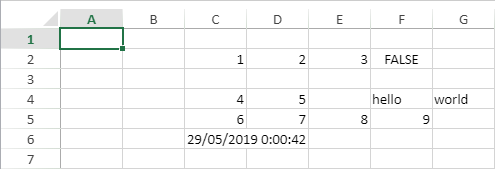
 $result:=VP Get values(VP Cells("ViewProArea";2;3;5;3))

  // $result[0]=[4,5,null,hello,world]

  // $result[1]=[6,7,8,9,null]

  // $result[2]=[null,{time:42,value:2019-05-29T00:00:00.000Z},null,null,null]
See also

PROPERTIES
Product: 4D
Theme: 4D View Pro Language
Number:
9773
HISTORY
Created: 4D v17 R6
ARTICLE USAGE
4D View Pro Reference ( 4D v18)


© 1985-2020 4D SAS / 4D, Inc. All rights reserved.